


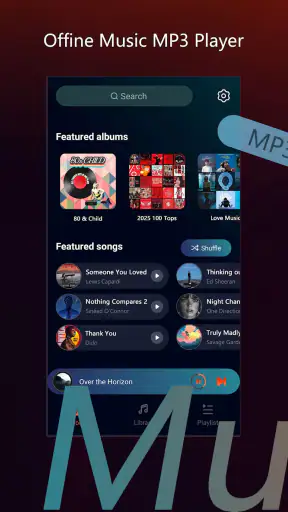
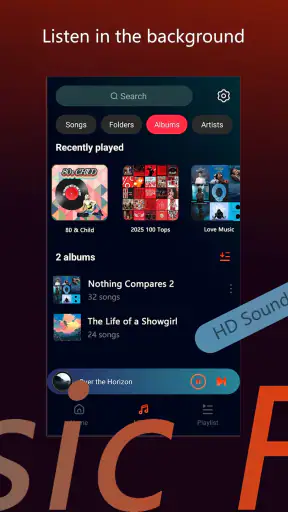
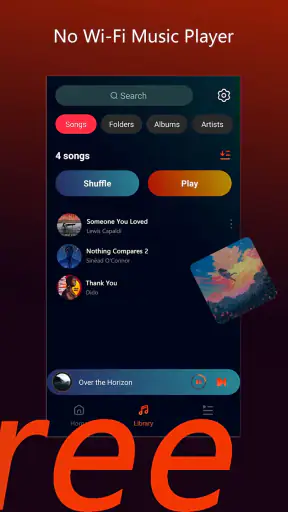
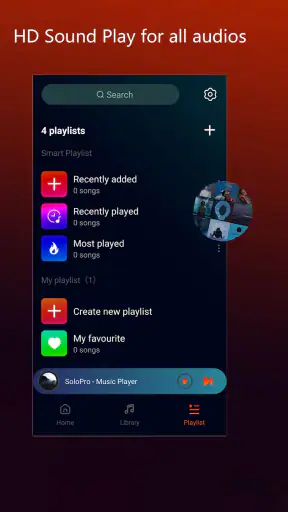
I approached SoloPro - Offline Player as an entertainment app for people who want a simple way to enjoy personal media without depending on a constant connection. Its name sets a clear expectation: this is centered on offline playback, not on discovering a large online catalog or joining a social viewing service. After spending time with it, my impression is that its appeal comes from keeping the experience focused. You open it, choose something available on your device, and get on with watching or listening.
That focus is also the first thing to understand before installing it. SoloPro is not the best match for someone looking for recommendations, cloud synchronization, live channels, or a highly social entertainment platform. It makes more sense for a person who already has media they want to use locally and prefers fewer distractions. I would especially consider it for travel, commutes, waiting rooms, or any situation where a dependable internet connection is not guaranteed.
The app is free to install and is listed for Everyone, which makes it approachable for a broad household audience. TingCoco Player is the developer behind it, and the current release is version 1.3.4. The app has reached more than a million installs and holds a 4.8 average from roughly twelve thousand ratings, so there is clear interest in this particular offline-player approach. Optional in-app purchases range from $2.99 to $19.99 per item, something worth keeping in mind if you want the basic experience to remain entirely free.
How SoloPro feels during everyday playback
Speed expectations before you start a long session
The main speed advantage of an offline player is straightforward: once the media is stored on your device, playback is not waiting for a stream to arrive from a remote server. That changes the feel of the experience compared with services that begin with loading screens, network checks, or changing stream quality. In practical terms, SoloPro is most attractive when your priority is getting to locally available content without building your evening around connectivity.
There is an important distinction here. Offline playback can reduce dependence on the network, but it does not make every part of the experience instantaneous. The app still has to locate, read, and prepare files on the device. A phone with a crowded storage area, unusually large media files, or limited free space may feel less immediate than a newer device with room to spare. I would therefore judge its speed by the whole workflow rather than by the first tap alone.
My preferred routine is to prepare content before I need it. I keep the files I expect to use in an easy-to-find location, close other demanding apps, and then open the player when I am ready. That small habit removes unnecessary searching and makes an offline tool feel much more direct. It is a useful distinction from streaming alternatives, where preparation usually means downloading inside a separate service and accepting that access may depend on that service’s rules.
The biggest speed benefit is freedom from a live stream, not a promise that every phone will behave identically. If your device is older or nearly full, the storage situation may matter more than the player itself. This is why I see SoloPro as a practical companion for organized local media rather than a magic solution for every playback problem.
What happens during heavier use
Light use is easy to imagine: open the app, select one file, and watch or listen for a while. The more revealing test is a longer session, especially when the phone is already doing other work. A realistic example would be a train journey where I start a video before leaving home, switch briefly to messages during a stop, then return to the player. An offline app is useful in that situation because the entertainment portion does not need to compete with an unstable mobile signal.
Heavy use also includes moving through several files, handling larger media, or leaving the player in use while the device has many background tasks. Those conditions can expose limitations that are invisible during a short trial. Battery use is still relevant because decoding media and keeping a screen active can consume power even when the network radio is quiet. Offline does not mean energy-free, so I would still begin a long trip with a charged phone or a portable battery.
Another trade-off appears when a person treats the app like a full media library. A dedicated streaming service generally wins for discovery because it organizes recommendations, subscriptions, and online catalogs around the user. SoloPro’s strength is narrower: it is better when I already know what I want to play and want fewer network-related interruptions. If I regularly jump between unfamiliar titles, an online alternative may feel more convenient even if it uses more data.
For a smoother heavy-use workflow, I would separate preparation from playback. Before leaving home, I would check that the intended files are actually stored locally, remove media I no longer need, and avoid filling the device to the edge. This is not glamorous advice, but it prevents the most common disappointment with offline tools: discovering at the moment of need that the content was never ready or that the phone has too little working room.
Reliability and recovery when something goes wrong
Reliability is where an offline player earns its place. A connection can disappear in a tunnel, on a flight, in a basement, or in an area with weak coverage. When the content is already on the phone, those interruptions should not define the viewing experience. That is the core reason I would choose this type of app over a browser-based player for a journey.
Still, offline reliability has its own conditions. The file must be readable, the storage must remain accessible, and the device must not interrupt the session through aggressive battery management or a system cleanup. If playback stops, I would first reopen the app, check whether the same file works again, and then try a different local file. That simple recovery sequence helps distinguish a temporary app interruption from a problem with one particular file.
I also recommend keeping important travel media in a clearly named folder rather than scattering it across downloads, messaging attachments, and temporary directories. This makes recovery faster because I know where to look if the app does not immediately present the item I expected. It also reduces the temptation to repeatedly tap around while the phone is under pressure from other tasks.
Compared with a streaming service, SoloPro can be more reliable in poor-signal conditions but less forgiving when the local file itself is unsuitable. Streaming platforms usually handle format conversion and delivery behind the scenes. With an offline player, the quality of the source file and the state of the device become more important. That is a fair exchange, but it means the user has more responsibility for preparation.
Device limits and the version to look for
SoloPro supports devices running Android 8.0 or later. That gives it a useful reach across older and newer Android phones, although support for an operating system does not guarantee the same experience on every model. Screen size, storage speed, available memory, battery condition, and the phone manufacturer’s background restrictions can all affect how comfortable a long playback session feels.
On a device with limited storage, the app should be considered alongside the media rather than in isolation. Video files can occupy far more room than people expect, and an offline workflow becomes frustrating if every new file forces a cleanup. I would reserve space before a trip and avoid assuming that a phone with enough room for the application automatically has enough room for a personal library.
Older hardware may also be a better fit for simpler files than for demanding ones. I would not buy a new phone solely to use this player, but I would keep expectations realistic if the device already struggles with other media apps. The most sensible test is a representative file and a session long enough to reveal heat, battery drain, or interruptions—not just a quick launch followed by an immediate uninstall decision.
The version number matters when troubleshooting. If the app behaves differently after an update, I would note that I am using version 1.3.4 before changing several settings at once. That makes it easier to identify whether the issue comes from the app, the file, or the device. I would also avoid judging the player solely by the rating, because a high average reflects broad satisfaction but cannot predict how it will handle every phone and every local media collection.
Where it fits beside familiar alternatives
SoloPro sits between two common habits. On one side are streaming services, which are excellent for discovery, synchronized catalogs, and effortless access when the network is strong. On the other side are general-purpose media players, which may offer a wider collection of controls and compatibility options but can feel more technical. SoloPro’s offline identity gives it a clear reason to exist: it is aimed at direct local entertainment rather than an all-purpose online ecosystem.
I would choose a streaming service when I want to browse, follow a series, or avoid managing files. I would choose a more advanced local player when I need extensive format controls, detailed library management, or specialist playback options. SoloPro is more appealing when I want a middle ground and do not want the app to become a project in itself.
That comparison also explains who should skip it. If your media life is almost entirely subscription-based, the app may add another step without solving a real problem. If you need professional-level control over unusual files, a specialist player may be a better investment. And if your main concern is finding new entertainment rather than playing what you already own, the offline focus will feel restrictive rather than liberating.
For families, the Everyone rating is reassuring from an age-label perspective, but that does not replace ordinary judgment about the files placed on a shared device. The label describes the app’s content rating, not every video or audio item a user might open with it. I would still organize shared media carefully and consider who can access the phone.
Practical habits that make the app more useful
My first useful tip is to create a small “ready to play” collection instead of treating the entire storage area as one giant library. Put the files for a trip, workout, or quiet evening together, then remove them when they are no longer needed. This reduces search time, protects free storage, and gives the offline experience a more intentional rhythm.
My second tip is to test the exact content before leaving a reliable connection. Open the file, move through it briefly, and confirm that the audio and picture behave as expected. A file that exists on the phone is not automatically a file that will be enjoyable to use. Testing early gives you time to choose another item rather than discovering the issue halfway through a journey.
My third tip is to treat interruptions as a diagnosis problem. If only one file fails, I would suspect the file first. If several items fail after the phone has been idle, I would look at battery restrictions or device memory. If the app itself repeatedly closes, I would restart the device and check that the installed release is version 1.3.4 before making a broader judgment. This approach is faster than assuming every problem is caused by the player.
A fourth trade-off is worth mentioning: keeping media offline improves independence from the network, but it shifts maintenance to the user. You must decide what to store, keep the device tidy, and watch battery levels. I consider that worthwhile for travel and unreliable coverage, but less worthwhile for someone who already has fast, stable access to a preferred streaming library.
Cost, expectations, and the final performance verdict
The free entry point makes SoloPro easy to try without committing money first. Optional items cost between $2.99 and $19.99 each, so I would pay attention to what is included in the basic experience before purchasing anything. The app’s store summary is simply an invitation to download and enjoy, while its short description is “SoloPro”; neither changes the practical question of whether local offline playback matches your habits.
In my view, the app’s perceived performance is strongest when three things line up: the content is already stored, the device has reasonable free space, and the phone is not struggling with several demanding tasks. Under those conditions, the offline design can feel calmer and more predictable than streaming. When those conditions do not line up, the responsibility becomes more visible, and a richer alternative may be easier.
I would recommend it to travelers, people with inconsistent connectivity, and anyone who keeps a personal collection of media on an Android device. I would also suggest it to users who dislike the distractions of large entertainment platforms and want a direct route to their own files. I would skip it if I mainly need discovery, cloud convenience, or advanced specialist controls.
Overall, SoloPro - Offline Player makes the most sense as a focused tool rather than a replacement for every entertainment app. Its value comes from reducing dependence on live streaming and giving local content a straightforward destination. The experience still depends on the phone, the files, and the preparation behind the scenes, but that is an honest and manageable trade-off. If your everyday scenario is “I already have something to watch and may not have a reliable connection,” this is a sensible free app to try.


